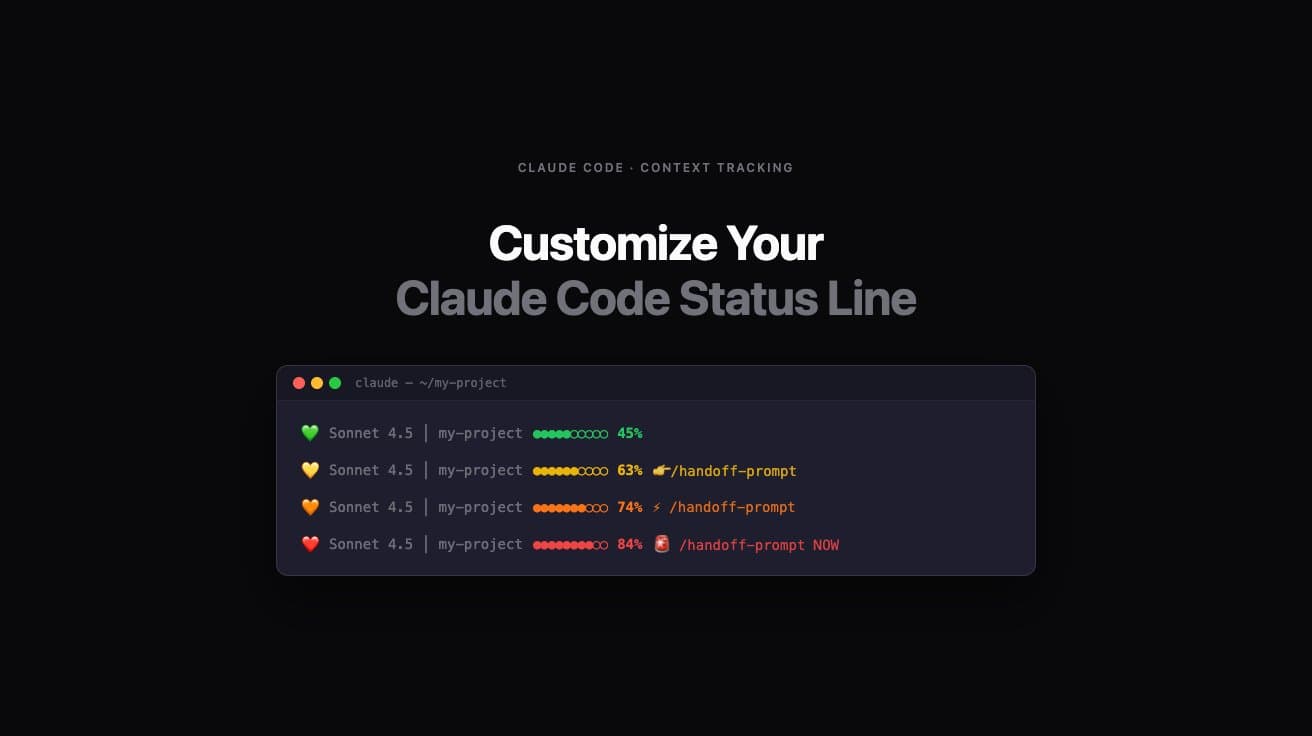
claude — ~/my-project
💚Sonnet 4.5 │ my-project●●●●●○○○○○45%
💛Sonnet 4.5 │ my-project●●●●●●○○○○63%👉/handoff-prompt
🧡Sonnet 4.5 │ my-project●●●●●●●○○○74%⚡ /handoff-prompt
❤️Sonnet 4.5 │ my-project●●●●●●●●○○84%🚨 /handoff-prompt NOW

Customize Your Claude Code Status Line

Get better context tracking before Claude Code degrades

Research-backed statusline themes with one-command installation. Know when to handoff before quality drops — not after.

Improve your long coding sessions by creating a fun customized context status line that reflects your personality. Pick from one of our themes, or build your own custom status line.

10 Themes — Pick One, Copy One Command

Open Claude Code. Paste the command. Done. Your statusline appears at the bottom of the terminal after the next interaction.

Performance Optimized

RECOMMENDED

Research-backed thresholds. Full implementation spec. Warnings link to the 8-section handoff methodology.

Sonnet 4.5 │ my-project████░░░░░░45%
Sonnet 4.5 │ my-project██████░░░░63%👉/handoff-prompt
Sonnet 4.5 │ my-project███████░░░74%⚠️ /handoff-prompt
Sonnet 4.5 │ my-project████████░░82%🚨 /handoff-prompt NOW
◻️

Minimalist Clean

Distraction-free. Color only at critical thresholds. Numbers only. Philosophy: show me what I need, when I need it.

Sonnet 4.5 │ my-project58%
Sonnet 4.5 │ my-project76%/handoff-prompt
Sonnet 4.5 │ my-project83%/handoff-prompt NOW
💻

Hacker/Terminal

Matrix-style green. Dim as context fills. Bold red alerts. Pure terminal energy. You're in the Matrix.

Sonnet 4.5 │ my-project▰▰▰▰▱▱▱▱▱▱42%
Sonnet 4.5 │ my-project▰▰▰▰▰▰▱▱▱▱63%[!] HANDOFF >> /handoff-prompt
Sonnet 4.5 │ my-project▰▰▰▰▰▰▰▱▱▱74%[!!] /handoff-prompt
Sonnet 4.5 │ my-project▰▰▰▰▰▰▰▰▱▱83%[!!!] /handoff-prompt EXECUTE NOW
🎨

Emoji Heavy

Visual, expressive, fun. Status emoji changes with each zone. Circle bar with color.

💚Sonnet 4.5 │ my-project●●●●●○○○○○52%
💛Sonnet 4.5 │ my-project●●●●●●○○○○63%👉/handoff-prompt
🧡Sonnet 4.5 │ my-project●●●●●●●○○○74%⚡ /handoff-prompt
❤️Sonnet 4.5 │ my-project●●●●●●●●○○84%🚨 /handoff-prompt NOW

Productivity Focus

Clear action words. Cyan productive zone. Gradient bar. Escalating urgency to STOP.

Sonnet 4.5 │ my-project▓▓▓▓▓▒░░░░55%
Sonnet 4.5 │ my-project▓▓▓▓▓▓▒░░░63%👉/handoff-prompt
Sonnet 4.5 │ my-project▓▓▓▓▓▓▓▒░░74%ACTION: /handoff-prompt
Sonnet 4.5 │ my-project▓▓▓▓▓▓▓▓▒░81%STOP: /handoff-prompt NOW
🚦

Traffic Light

Red, yellow, green. Universal. Zero learning curve. GO → SLOW DOWN → STOP.

🟢Sonnet 4.5 │ my-project■■■■■■□□□□68%
🟡Sonnet 4.5 │ my-project■■■■■■■□□□74%🟡 SLOW - /handoff-prompt
🔴Sonnet 4.5 │ my-project■■■■■■■■□□83%🔴 STOP - /handoff-prompt NOW
🔋

Battery Indicator

Context as battery charge. Battery icon changes as you drain it. Everyone knows the low-battery feeling.

🔋Sonnet 4.5 │ my-project████░░░░░░45%
🔋Sonnet 4.5 │ my-project██████░░░░63%👉/handoff-prompt
🪫Sonnet 4.5 │ my-project███████░░░74%⚠️ /handoff-prompt
🪫Sonnet 4.5 │ my-project████████░░82%🔴 RECHARGE: /handoff-prompt NOW
🔬

Developer Debug Mode

Exact token counts. Decimal precision. Session time. Every number exposed. Show me everything.

Sonnet 4.5 │ my-project████░░░░░░48.2%(96,400 / 200,000) | 1h 12m
Sonnet 4.5 │ my-project██████░░░░63.0%(126,000 / 200,000) | 1h 45m 👉/handoff-prompt
Sonnet 4.5 │ my-project███████░░░74.0%(148,000 / 200,000) | 2h 03m ⚠️ /handoff-prompt
Sonnet 4.5 │ my-project████████░░82.0%(164,000 / 200,000) | 2h 18m 🚨 /handoff-prompt NOW
🌸

Calm & Aesthetic

Soft pastels. Diamond bar. Gentle reminders. Zen coding environment. No stress, just awareness.

Sonnet 4.5 │ my-project◆◆◆◆◆◇◇◇◇◇55%
Sonnet 4.5 │ my-project◆◆◆◆◆◆◇◇◇◇63%💭 /handoff-prompt
Sonnet 4.5 │ my-project◆◆◆◆◆◆◆◇◇◇74%🌸 /handoff-prompt
Sonnet 4.5 │ my-project◆◆◆◆◆◆◆◆◇◇83%💗 /handoff-prompt gently
🎮

Speedrun/Gaming

HP hearts that RUN OUT as context fills. XP levels. Boss fight alerts. Your coding session is a speedrun.

💚 Lv.5Sonnet 4.5 │ my-project❤️❤️❤️💔🖤🖤🖤🖤🖤🖤52%
💛 Lv.7Sonnet 4.5 │ my-project❤️❤️💔🖤🖤🖤🖤🖤🖤🖤63%⚔️ CHECKPOINT: /handoff-prompt
🧡 Lv.8Sonnet 4.5 │ my-project❤️❤️💔🖤🖤🖤🖤🖤🖤🖤74%🛡️ BOSS INCOMING - /handoff-prompt
❤️ Lv.9Sonnet 4.5 │ my-project❤️💔🖤🖤🖤🖤🖤🖤🖤🖤83%💀 BOSS FIGHT - /handoff-prompt NOW

Why 60–70%, not 100%? The science behind context degradation

Claude Code's context window holds everything — your instructions, the conversation history, every file it's read, every response it's given. As that window fills, older context gets deprioritized. The model still responds, but the quality of those responses quietly degrades.

The research-backed thresholds these themes use:

0–60%Full performance

Peak quality. Work freely.

60–70%Consider handoff

Quality still good, but this is the ideal time to handoff for complex tasks.

70–80%Noticeably degrading

Responses getting vaguer. Start your handoff now.

80–85%Critical

Immediate action needed. Quality suffering.

85%+Auto-compact triggers

Claude Code compresses context automatically. Quality loss is significant.

The best practice: use the 8-section handoff methodology at 60–70% to preserve context quality with a comprehensive continuation document. That's why every theme above links to dontsleeponai.com/handoff-prompt at the critical thresholds.

How to install a Claude Code statusline (3 steps)

Works in VS Code terminal, iTerm2, Terminal.app — any ANSI-capable terminal.

Prerequisites

Claude Code CLI v2.0.27+ — check with claude --version
jq installed — macOS: brew install jq · Linux: sudo apt install jq
Terminal with ANSI color support — VS Code, iTerm2, and Terminal.app all work
1

Copy a theme command

Pick a theme from the gallery above. Click "Copy Command" — it copies the full self-contained /statusline prompt to your clipboard.

2

Paste into Claude Code and press Enter

Open Claude Code in any terminal. Paste the copied command and hit Enter. Claude Code generates the statusline script automatically — takes about 5–10 seconds.

3

Verify it's working

Send your next message to Claude Code. The statusline appears at the bottom of the terminal: Sonnet 4.5 │ my-project ████░░░░░░ 45%

Or build your own custom statusline

Customize colors, messages, icons, and bar style. See a live preview. Copy your command.

Load a preset

Live preview

— at 45% (safe)
Sonnet 4.5my-project█████░░░░░45%
— at 65% (caution)
⚠️Sonnet 4.5my-project███████░░░65%👉/handoff-prompt dontsleeponai.com/handoff-prompt
— at 75% (warning)
🔶Sonnet 4.5my-project████████░░75%⚠️ /handoff-prompt dontsleeponai.com/handoff-prompt
— at 85% (critical)
💀Sonnet 4.5my-project█████████░85%🚨 /handoff-prompt NOW - dontsleeponai.com

Customize

Display

Progress bar

Colors

Safe zone0–60%
Caution60–70%
Warning70–80%
Critical80–100%

Warning messages

At 60%
At 70%
At 80%

Icons / emojis

Safe (0-60%)
Caution (60%)
Warning (70%)
Critical (80%)

Generated command

/statusline show model name, directory, context percentage. Use green (0-60%), yellow (60-70%), orange (70-80%), red blinking (80%+). Icons: caution icon: ⚠️, warning icon: 🔶, critical icon: 💀. Add messages at 60%: "👉/handoff-prompt dontsleeponai.com/handoff-prompt", at 70%: "⚠️ /handoff-prompt dontsleeponai.com/handoff-prompt", at 80%: "🚨 /handoff-prompt NOW - dontsleeponai.com". Use █░ for the progress bar with 10 blocks. Dim the model and directory names.

Frequently asked questions

Why 60%, 70%, and 80% — why not 90% or 100%?

Research shows Claude Code context quality begins degrading at 60–70%, not near 100%. By 80%, responses are noticeably worse. Claude Code also triggers auto-compact at 85–90%. Using these thresholds gives you actionable warnings before degradation starts, not after.

What is /statusline?

Claude Code has a built-in /statusline command for configuring a custom status bar at the bottom of the Claude Code interface. You define what to display and how; Claude Code handles the rendering and updates it after every interaction.

Does this work in VS Code?

Yes. The statusline renders inside Claude Code's own interface, which works in VS Code's integrated terminal, iTerm2, Terminal.app, or any terminal that supports ANSI color codes.

Can I customize the thresholds?

Yes. Use the generator above to set your own thresholds, colors, and messages. Or copy any theme command and modify the text directly before pasting into Claude Code.

The statusline isn't appearing — what do I do?

First, restart your Claude Code terminal (exit and reopen). Still blank? Check that ~/.claude/settings.json has a statusLine section. Verify jq is installed by running jq --version. Check that the script is executable: chmod +x ~/.claude/statusline.sh. Then send one message to Claude Code to trigger the first update.

Statusline shows 0% or jumps around randomly?

Heavy tool use is the culprit. When Claude Code runs many Bash commands, file reads, or edits back-to-back, the last 20 lines of the transcript may be all tool calls — no assistant message with token counts. The script reads nothing and reports 0%, or grabs a stale reading. Fix: open ~/.claude/statusline.sh and find the line around line 32–33 that greps for "type":"assistant". Change tail -20 to tail -50.

before:last_msg=$(tail -20 "$transcript" | grep '"type":"assistant"' | tail -1)
after: last_msg=$(tail -50 "$transcript" | grep '"type":"assistant"' | tail -1)

Save the file. No restart needed — takes effect on your next message. Confirmed on Claude Code v2.0.27+.

How do I switch to a different theme?

Just run a new /statusline command from any theme above. It overwrites the previous one automatically — no manual cleanup needed.

How do I remove the statusline entirely?

Delete the statusLine section from ~/.claude/settings.json. That's it. No scripts to hunt down — Claude Code stops calling the script as soon as the setting is removed.

The statusline shows 0% — is that wrong?

No — this is normal for brand new sessions before any messages are sent. Send one message and the percentage updates immediately.

What is the handoff methodology linked in the warnings?

The 8-section continuation methodology at dontsleeponai.com/handoff-prompt. It structures your handoff so the next Claude Code session picks up exactly where this one left off — with no guessing, no re-explaining, no lost context.

Will this slow down my terminal?

No. The statusline runs after each Claude Code interaction, not in a continuous loop. It's triggered by Claude Code itself and adds negligible overhead.

Ready to level up

These themes warn you WHEN to handoff.

Learn HOW to handoff with the 8-section continuation methodology at dontsleeponai.com/handoff-prompt. Your next session picks up exactly where this one left off.

Every day is magic. We are the prospectors of 1849 and there is gold in them hills. Be the one who prospects it.

Don't sleep on AI.

© DontSleepOnAI.com — All rights reserved.